Online Services
What is the NHS App?
The NHS App is owned and run by the NHS. It can be accessed by anyone aged 13 and over registered with an NHS GP surgery in England or Isle of Man.
Once you have verifed your identity in the app, you will have easy, 24/7 access to a growing range of health services and information.
It doesnt replace existing services. You can still contact your GP surgery in the usual ways.
What does the NHS App do?
Your Health
- View your GP health record - view your medical history, test results, allergies and medicines.
- Register your organ donation decision - choose to donate some or all of your organes and check the registered decision.
- Take part in health research - regsiter be 'Be Part of Research' to help us provide better care and treatment.
Prescriptions
- Order repeat prescriptions - request repeat prescription without having to contact your GP surgery.
- Nominate a pharmacy - choose which pharmacy your prescription is sent to.
Appointments
- Book appointments with your GP surgery - book, view and cancel appointments.
- Book and manage hospital appointments in one place - you can choose your treatment provider from a list provided by your GP/referrer, and see information on most of them, including who to contact, waiting times, distance and booking details.
- Manage vaccination appointments - book, amend or cancel vaccination appointments.
Help someone else
- Linked profiles - access the health records, appointments and prescriptions of people you care for (including children) - or get help from someone you trust. You will need to request by proxy access to do this by filling a form out at the practice with ID and proof of LPA or caring responsibilties. For further information regarding proxy access click here.
Advice and Information
- Search symptoms, conditions, and treatments - use the health A_Z to check symptoms and treatments, and get advice on what to do next.
- Get health advice through 111 online - check if you need urgent help and find out what to do next.
- Find NHS services - search for services near you.
- Check you NHS number - check you NHS number and manage your contact details within the NHS App.
Send and receive messages
- Contact your GP surgery - request care from your GP surgery using an online form
- Receive messages and notifications - view messages from your GP surgery and get notiifications through your phone or tablet.
Patchs
Why use PATCHS?
- You can create an account for PATCHS from home
- Quick & easy to use - just answer a few simple questions to get started
- Avoid long waits for a GP appointment
- Access PATCHS through your GP practice website or your smartphone, at a time that suits you
- You can access a range of services: GP consultations, health advice, fit notes, medications & more
- Video Consultations
How do I get started with PATCHS?

- You can create an account for PATCHS via your GP practice website. You’ll be asked to enter your email address and set a password.
- Once you have created an account, you can access PATCHS by clicking the link on your GP website or opening the PATCHS app on your smartphone. Login by entering your email address & password.
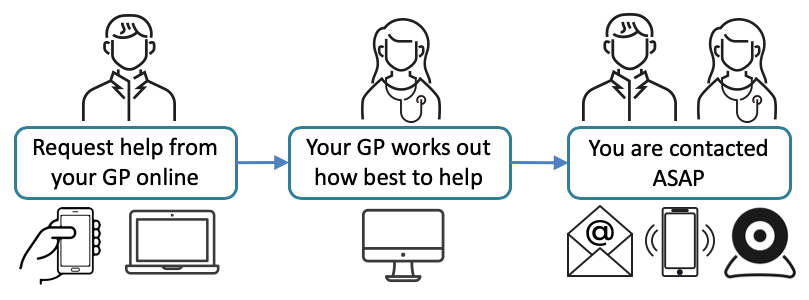
- Choose the appropriate option and answer a few simple questions to help your GP understand your problem.
- Your answers are sent to your GP who responds as quickly as possible. Initial responses may be via online message or phone, with face-to-face or video consultation appointments scheduled if necessary.
Proxy Access
GP surgeries can give someone secure access to another patient's GP services, so they can help them manage their health and care. This is sometimes called proxy access or third party access.
A proxy may be able to act for the person they support, by:
- ordering repeat prescriptions
- booking appointments
- contacting the surgery or speaking to surgery staff
- viewing test results or vaccinations
- accessing all or part of the GP health record, to help with health-related tasks and managing health issues
Reasons for proxy access
Reasons for wanting or needing help could include:
- having a physical or mental health condition
- technical barriers, for example not having a computer or a smartphone
- language barriers, for example if it's not easy to access services in English
- practical reasons, for example working shifts or unsocial hours
- age, for example a child may need a parent to manage their GP services
If you're aged 16 or over, you can ask for someone to be your proxy for any reason. It does not stop you having access to your GP services yourself.
If you help someone else with prescriptions, booking appointments or managing their health and care, getting proxy access could make it easier and more convenient.
For additional information regarding Proxy Access please visit: Accessing GP services for someone else, with proxy access - NHS
Page created: 14 August 2023